
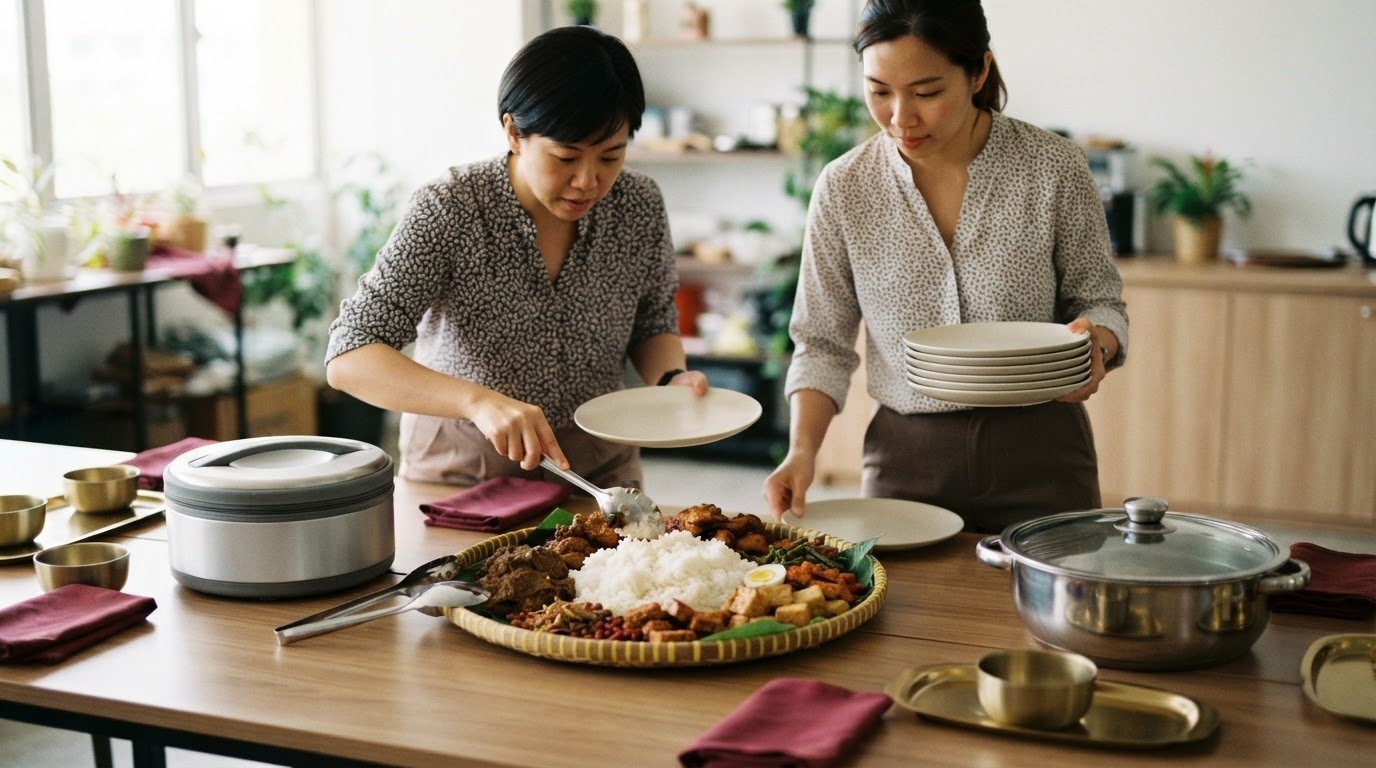

A well-organised office lunch order starts with clear numbers and details. To understand how to order catering for an office lunch, confirm attendance and dietary needs, choose a menu that fits your budget, then enter the delivery details and payment information online. In Singapore, allow at least one day’s notice, subject to vendor availability.
Food is only one part of a smooth office lunch. Headcount, dietary needs and serving arrangements matter too. This guide covers how to gather staff requirements, compare menu options, plan the order and complete a booking. You’ll also learn how to choose a format for your group and keep the details organised.
Key Takeaways
- Collect dietary requirements and preferences alongside attendance, then use confirmed headcount to plan the order.
- Set a budget before choosing dishes, and account for drinks, desserts, delivery fees and a buffer for extra attendees.
- Give the order at least one day’s notice in Singapore, subject to vendor availability, and leave time for building access and setup.
- Keep headcount, menu choices, delivery instructions and payment under one organiser to make the process easier to manage.
- Use online ordering for a straightforward order, and plan ahead when a larger group or tailored menu needs more coordination.
Collecting dietary restrictions, allergies and preferences
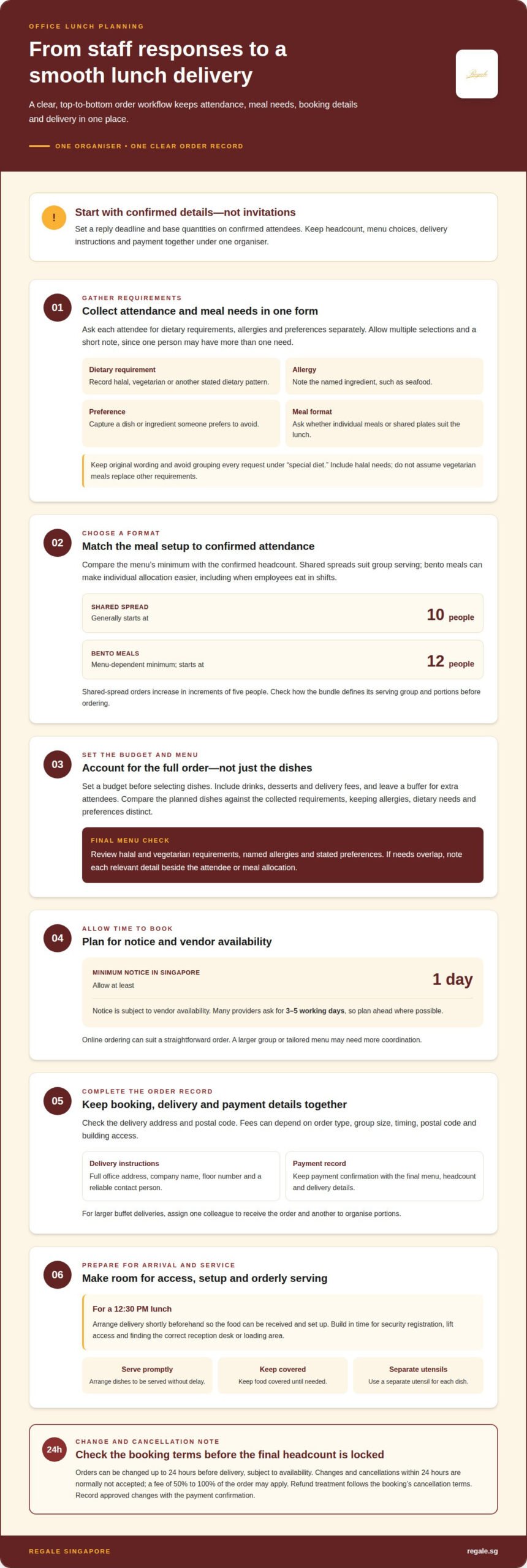
Start with a clear headcount and a structured way to collect dietary details. A shared form gives each attendee the same fields and keeps responses together. Ask everyone to list dietary requirements, allergies and food preferences separately. For example, “vegetarian” describes a dietary pattern, while “seafood allergy” identifies an allergy. Keeping these entries distinct helps you represent each need accurately when selecting dishes.
Set a reply deadline before choosing quantities, then base the order on confirmed attendees rather than invitations sent. Include a field for halal requirements, since halal food matters to some teams in Singapore. Make vegetarian choices a separate option, not an assumed substitute for every other requirement. A person may have more than one need, so allow multiple selections and a short note for special details.
- Dietary requirement: Record halal, vegetarian or another stated dietary pattern.
- Allergy: Note the ingredient named by the attendee, such as seafood.
- Preference: Capture choices such as avoiding a particular dish or ingredient.
- Meal format: Ask whether individual meals or shared plates suit the lunch arrangement.
Keep the original wording when transferring responses into the order. Avoid grouping every request under a broad label such as “special diet.” Instead, create a concise summary of confirmed attendees, halal requirements, vegetarian meals, named allergies and other stated preferences. This gives the organiser a practical reference and reduces the risk of overlooking details in chat messages. Share only the information needed to organise the meal.
Bento meals can make individual meal allocation easier when employees eat in shifts. For Singapore catering, the minimum for bento depends on the menu and starts at 12 people. A bento format also gives the organiser a place to match a meal with an attendee’s recorded requirement. Shared plates suit a team gathering in a pantry or meeting room, but the organiser should keep dietary needs visible when arranging which dishes are served.
Before finalising the menu, compare the collected requirements with the planned dishes. Account for halal and vegetarian requirements, named allergies and preferences without treating them as interchangeable. If needs overlap, note each relevant detail beside the attendee or meal allocation. This final review turns responses into useful ordering information and helps the team plan with care for colleagues’ needs.
Managing orders, payment and delivery details
Assign one organiser to manage the headcount, menu, delivery instructions and payment record. Keeping everything in one order summary helps prevent details from being split across chats.
Delivery Fees and Service Areas
In Singapore, delivery fees can depend on order type, group size, timing, postal code and building access.
Check the delivery address against the order details, including its postal code. These charges show why an island-wide delivery estimate should account for the specific destination, not just the meal format.
Delivery Timing and Office Access
For a 12.30 pm lunch, arrange delivery shortly beforehand so the food can be received and set up. Build in time for security registration, lift access and locating the correct reception desk or loading area.
Give the caterer the full office address, company name, floor number and a reliable contact person. For a larger buffet, assign one colleague to receive the delivery and another to organise the portions. A clear handover helps colleagues find dishes without crowding the entrance.
For buffet food safety and serving, arrange dishes to be served promptly, keep them covered until needed, and use separate utensils for each dish. These steps help maintain orderly service and reduce the chance of foods being mixed during the meal.
Keep payment details with the final menu and delivery record. The organiser can then match the payment confirmation to the agreed headcount, selected dishes and destination. For a more orderly booking, keep catering arrangements together.
Cancellations, Amendments, and Refunds
Singapore catering orders can be changed up to 24 hours before delivery, subject to availability. Changes and cancellations within 24 hours of the event are normally not accepted, and a fee of 50% to 100% of the order may apply. The refund treatment follows the cancellation terms for that booking, so distinguish refunds, credits and retained charges in the order record.
Record the final headcount and approved changes in one place alongside the payment confirmation. This gives the organiser a clear reference if the delivery time, food selection or attendance changes before lunch.
Catering bundle prices and minimum order
In Singapore, shared-spread catering generally starts at 10 people; bento minimums depend on the menu and start at 12 people. Allow at least one day’s notice, subject to vendor availability, although many providers ask for three to five working days.
Minimum Order Sizes
Minimums affect both the format and the final headcount used for booking. For a shared spread, plan for at least 10 people. For bento, the menu determines the minimum, which starts at 12 people. These thresholds can make individual meals less practical for a small team, while a shared spread may suit a casual office occasion with enough confirmed attendees.
Before selecting a bundle, compare its stated minimum with confirmed attendance, not invitations. If the team is smaller than the minimum, choose a different menu or format. Check how the bundle defines its serving group and portion counts. This helps avoid ordering a spread sized for more people than will attend or assuming one individual meal serves several colleagues.
Order Increments and Lead Time
Shared-spread orders in Singapore increase in increments of five people. If the confirmed headcount falls between available increments, plan using the next applicable order quantity. This can affect the number of portions and the total bundle selected, so settle attendance before placing the order.
Lead time also shapes the menu choice. One day’s notice is the minimum stated for Singapore catering, subject to vendor availability, while many providers ask for three to five working days. For a recurring team lunch or a larger occasion, begin planning earlier. This gives the organiser time to gather requirements, choose a format and schedule delivery without rushing the final details.
Catering Bundle Prices
Compare menu options by what they include, not just the headline total. Check the dishes, portions and meal format, then consider whether the selection suits a casual lunch or a more formal office occasion. A spread with several dishes can offer variety, while individually packed meals can simplify allocation when colleagues eat separately.
Build a like-for-like comparison by recording the headcount, menu, delivery fee and any setup requirements for each option. Include drinks or desserts only if they are part of the planned meal, and list additional items separately from the main menu. This makes the final order easier to review and helps keep the complete catering plan clear.
Set the team’s budget before choosing dishes, then compare bundles against both attendance and required format. The final cost depends on the menu, group size, service format and delivery details, and is provided after a quote request. For a recurring lunch, keep the confirmed menu and final headcount together. Those records help the organiser refine future orders without assuming the same bundle suits every occasion.
Catering for different budgets and guest counts
Set a per-person ceiling and an overall limit before comparing menus. Assess each option against the confirmed guest count, meal format and delivery requirements.
Setting a Per-Person Budget
Divide the total food budget by the confirmed guest count to establish a working amount per person. A corporate lunch for a small project team and a birthday celebration for a larger department may need different menu formats, even with similar spending limits. Use the per-person figure to compare options consistently rather than judging bundles by their total alone.
Decide what the budget needs to cover. Include the main meal first, then account for drinks, desserts and delivery fees where applicable. If the lunch needs halal or vegetarian choices, factor those requirements in before comparing menus. This keeps the dishes and format your guests need at the centre of the decision.
Keep the budget aligned with the occasion. A casual team meal may call for a practical spread, while a client-facing celebration may need a broader selection. The price depends on the order and its requirements, and is given after a quote request. Menu choices, guest count, service format and delivery details shape the overall cost.
Planning the Catering Budget
Translate the per-person limit into an overall catering budget using the expected number of guests. Use confirmed attendance as the planning base, then decide how to handle late additions. A buffer can help accommodate extra attendees; size it according to how uncertain the headcount is. Keep that reserve separate from the amount allocated to the main menu.
Compare options for the same guest count and with the same inclusions. For instance, place two spreads side by side and note whether each includes desserts or drinks, and whether delivery is charged separately. Delivery arrangements can change the total, so include them in the comparison. This is more useful than comparing menu prices alone.
Guest count can also affect which format suits the event. Individual meals may help when colleagues arrive in shifts; a shared spread may better suit a meeting-room gathering. For an office elsewhere on the island, include the delivery destination in the budget review. A final check of attendance, menu, extras and delivery helps keep the order within its planned limit.
For recurring lunches, record the final guest count and actual order components after each meal. Compare them with the original plan before setting the next budget. If a corporate celebration or birthday has different needs, treat it as a separate occasion rather than copying a routine team-lunch order. This gives the organiser a clearer basis for choosing a suitable format.
Ordering catering through an online platform
An online order is easiest when the menu, quantities and delivery details are ready together. For a small office meeting, choose a straightforward menu. For a larger gathering or a tailored order, contact Regale to discuss the requirements and coordinate the details.
Prepare the order information before opening the menu. Keep the confirmed headcount, dietary requirements, budget and delivery address together. Then work through the order in sequence:
- Select the meal format. Choose individual meals for colleagues eating at different times, or shared dishes for a group gathering.
- Review the menu. Compare dishes against dietary needs and preferences collected from attendees.
- Enter quantities. Use the confirmed headcount and account for the minimum order and applicable increments.
- Add delivery details. Include the office address, company name, floor and delivery contact.
- Review payment and order information. Check the selected dishes, portions, delivery timing and total before completing payment.
A practical way to learn how to order catering for an office lunch online is to consider how each choice affects the next. Individual meals may require quantities for each meal selection, while shared dishes depend on the overall guest count. A meeting with staggered breaks may suit individually allocated meals; a team lunch in one room may work better with dishes arranged for sharing. Match the format to how colleagues will gather and eat.
Plan the order ahead, especially for a larger group. More attendees can mean more menu choices, dietary details and delivery arrangements to coordinate. A simple order for a small team may be quicker to organise online. For a corporate gathering with a tailored menu, discuss the selections and quantities with Regale before confirming the order.
Before submitting, compare the order summary with the organiser’s final list. Check that the headcount matches, each dish has the intended quantity and dietary requirements are reflected in the selections. Confirm the delivery address and contact details carefully. A missing building name, floor or reception detail can complicate the handover on lunch day.
Keep the order confirmation and payment record together. If colleagues ask which dishes were selected, the organiser can refer to one agreed summary instead of reconstructing choices from messages. For recurring team lunches, retain the menu and quantities as a reference, then update them for each new meeting or attendance change. With a clear process, you’ll know how to order catering for an office lunch while keeping the booking details organised.
Ready to plan the meal details? Start planning your office lunch order with the menu, headcount and delivery information prepared.
Regale Singapore: Halal Catering
Regale Singapore offers halal catering for office teams planning a meal with Indonesian flavours. The menu includes Nasi Sambal Goreng, Nasi Ambeng and other Indonesian dishes, giving teams options for a lunch or workplace gathering. Regale also brings Western favourites and local delights together on its all-day menu, so there is something for everyone at the table.
Use the headcount, dietary requirements, budget and delivery details gathered during planning to define the order. These details give your team a clear starting point for comparing individual meals with a shared spread. Contact Regale Singapore to discuss catering for your office lunch.
Plan a More Considered Office Lunch
Make lunch a deliberate pause in the working day, not another item to rush through. A shared meal can create space for colleagues to connect, welcome new team members or mark a workplace occasion. Choose an approach that suits the gathering, whether it calls for a relaxed team meal or a more formal setting.
A practical way to think about how to order catering for an office lunch is to make the menu part of the occasion. Consider the atmosphere you want, how colleagues will share the meal and which dishes they’ll remember afterwards. This helps turn the order from a logistical task into a thoughtful part of the team’s day.
For an office meal featuring Indonesian cuisine, contact Regale Singapore about office catering. Share the occasion and the kind of dining experience you have in mind to begin the conversation. With the right plan in place, your next team lunch can feel welcoming and well considered.
Frequently Asked Questions
How to plan an office lunch catering order in Singapore?
Set the lunch date, serving time and occasion first, then choose one person to coordinate the order. Keep menu selection separate from internal approval so the organiser can gather choices before submitting payment. A project meeting may need food ready between agenda sessions, while a team celebration may allow a longer shared meal. Keep the final order record with the event calendar entry.
How many servings should I order per person for office lunch catering?
Use the stated serving plan for the selected dishes rather than assuming every menu feeds the same number. Consider whether the meal is a main lunch or a light spread, and whether it includes sides. For a working meeting, allow for guests who may arrive late or leave early by arranging clear meal allocations. The format and menu composition matter as much as the attendee count.
How much does office lunch catering cost per person in Singapore?
The per-person price depends on the menu, guest count, meal format and delivery arrangements. For a useful comparison, calculate the full order total across confirmed attendees, then separate food from delivery, setup, drinks and desserts. The price for a specific catering order depends on its requirements and is given after a quote request. Compare like-for-like menus, not just the first per-person figure displayed.
What catering menus and dietary options are available in Singapore?
Start with the occasion and the team’s stated requirements when choosing a menu. Regale Singapore offers halal catering, including Nasi Sambal Goreng and Nasi Ambeng, alongside Indonesian classics, Western favourites and local delights. Distinguish halal requirements, vegetarian preferences and named allergies when selecting dishes. Don’t assume one option automatically covers another.
How to compare buffet, bento and individually packed office lunch catering?
Choose a buffet when colleagues can gather and serve themselves, and consider bento or individually packed meals when people eat at different times. For a meeting with a fixed break, packed meals can simplify distribution and reduce interruptions. A buffet may suit a shared team occasion where guests can choose among dishes. Compare serving arrangements, available space and how the meal fits the event schedule.
How to place and pay for a corporate catering order in Singapore?
Prepare the event details and menu selections before entering them into the ordering platform. Review the order summary for quantities, delivery information and selected extras, then complete payment using the options presented at checkout. Save the confirmation with the company’s expense record, noting the event name and approver. For a larger corporate order or tailored menu, contact Regale to discuss the details before confirming.
What delivery fees, setup services and collection rules apply to catering orders?
Review each line in the final order total, including delivery and any setup costs. Check that the listed service matches your event, such as delivery only or buffet setup. If collecting the order, follow the pickup time and handover instructions provided with it. Keep the organiser’s contact details available for the handover.
How to accommodate halal, vegetarian and common food allergies in a catering order?
Record halal requirements, vegetarian choices and allergies separately, then match each one to the selected dishes. A vegetarian meal doesn’t automatically meet a halal requirement, and an allergy needs its own clear note. Share the exact ingredient named by the attendee with the organiser, and keep meal allocations distinguishable during service. Don’t describe a dish as suitable for an allergy unless that information is provided.
